The Lookup Nobody Sees
You type google.com in your browser. Before any TCP connection or HTTP request, the browser needs an IP address. It asks the operating system. The OS checks its local cache. If not cached, it asks the configured recursive resolver (usually your ISP's DNS server, or 8.8.8.8 / 1.1.1.1). This is where the real work begins.
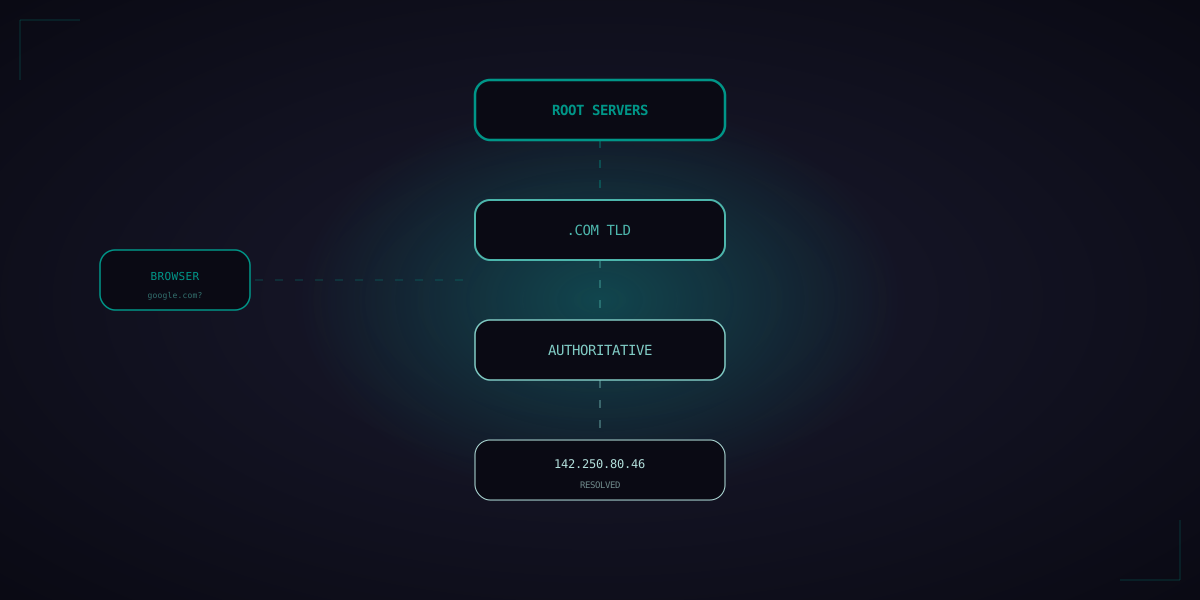
The recursive resolver doesn't know the answer either (assuming a cold cache). It starts a chain of queries that traverses the global DNS hierarchy:
Figure 1: DNS resolution walks the hierarchy: recursive resolver → root server → TLD server → authoritative nameserver. Each answer is cached with a TTL to speed future lookups.
The 13 Root Server Clusters
There are 13 root server addresses (a.root-servers.net through m.root-servers.net), but over 1,500 physical servers worldwide via anycast. When your resolver queries a root server, anycast routing sends the query to the nearest physical instance. Root servers don't know the IP of google.com — they only know which servers handle .com, .org, .net, etc.
Caching and TTL
Every DNS response includes a TTL (Time To Live) — how long the answer can be cached. Google's A records have a TTL of 300 seconds (5 minutes). Your browser, OS, and recursive resolver all cache the result. After the first lookup, subsequent requests for google.com return instantly from cache.
But TTL is a tradeoff: short TTLs allow fast failover (if google.com's IP changes, everyone sees the new IP within 5 minutes). Long TTLs reduce DNS traffic and latency. Some CDNs like Cloudflare use TTLs as low as 30 seconds to enable rapid traffic shifting during incidents.
DNS Over HTTPS (DoH) and DNS Over TLS (DoT)
Traditional DNS queries are plaintext UDP. Your ISP, coffee shop WiFi, and anyone on the network can see every domain you visit. DNS over HTTPS (DoH) wraps DNS queries in HTTPS to the resolver (e.g., https://dns.google/dns-query). DNS over TLS (DoT) uses TLS on port 853. Both encrypt the query content. Firefox, Chrome, iOS, and Android all support DoH natively.
DNS as a Load Balancer
DNS can return multiple IP addresses for the same domain. Round-robin DNS rotates the order. Geo-DNS returns different IPs based on the client's location (Route 53's latency-based routing, Cloudflare's load balancing). Health-checked DNS removes IPs for unhealthy servers. This is the simplest form of global server load balancing — no proxy needed, no extra hop, just clever DNS responses.
Netflix uses Route 53's latency-based routing to direct users to the nearest AWS region. A user in Tokyo gets IPs for ap-northeast-1, while a user in London gets eu-west-1. All transparent through DNS.